- Published on
Free Tools for CORENET X Compliance: Bimeco Validator Features
What is CORENET X
CORENET X is Singapore's integrated submission platform for building approvals, requiring BIM models in IFC+SG format. Meeting these requirements shouldn't require expensive software licenses. The Bimeco Validator is a completely free, web-based tool built specifically for CORENET X compliance—helping consultants and contractors validate and edit IFC+SG parameters without paying thousands annually for traditional BIM tools.
The Bimeco Validator: Free Tools for All
The Bimeco Validator is purpose-built for CORENET X BIM submissions. It's a free, web-based tool that helps consultants and contractors validate and update their IFC+SG models for regulatory compliance. No installation required, no subscription fees, no hidden costs—just open your browser and start validating.
Beyond solving immediate compliance needs, the Bimeco Validator represents a broader vision: building a modern, cloud-native OpenBIM platform that makes BIM coordination more accessible, more usable, and more aligned with real-world project delivery. As outlined in our OpenBIM roadmap, we're working to reduce the fragmentation in BIM workflows while keeping tools accessible to firms of all sizes.
| Feature | Status | Description |
|---|---|---|
| Large Model Loading | ✅ Available Now | Upload and validate models up to 5GB completely free. Fast loading with Singapore-based servers—typical 1GB models load in under 15 seconds for returning users |
| Viewing System Entities | ✅ Available Now | Click any error to highlight the element in 3D. Inspect all IFC+SG properties required for each IFC Entity |
| Search & Filter Queries | ✅ Available Now | Find issues fast among thousands of errors. Search by entity type (IfcDoor, IfcWindow), filter by error type, group by level—prioritize fixes that matter |
| IFC Parameter Editing | ✅ Available Now | Fix errors directly in browser without Revit or ArchiCAD. Controlled inputs ensure compliance. Bulk-edit 200 doors at once. Save progress across multiple sessions |
| AI-Assisted Search | 🤖 Q2 2026 | Ask natural language questions like "Show all fire-rated doors on Level 3" or "Which walls lack thermal properties?" Get instant, accurate results without learning query syntax |
| Model Federation | 🔗 Q2 2026 | Load architectural, structural, and MEP models together. Set access controls per discipline. Coordinate across trades before consolidated CORENET X submission |
| Clash Detection | 🔍 Q2 2026 | Catch conflicts automatically before submission. Find beams clashing with ducts, architectural elements interfering with structure—avoid approval delays |
| Bi-Directional Revit Sync | 🔄 Q2 2026 | Make edits in the validator, sync back to Revit automatically. No manual export-import cycles. Keep your native BIM model and validator corrections in perfect sync |
Perhaps most importantly, the validator will continue to be free for all consultants and contractors—both current features and upcoming releases scheduled for Q2 2026.
Why Choose the Bimeco Validator?
100% Free No subscription fees, no per-project charges, no hidden costs. Whether you're validating a single shophouse or a multi-tower development, you get full access to all features.
Web-Based No software installation required. Works on any device with a browser—Windows, Mac, or even tablets. Your models load directly in the browser using optimized IFC processing.
Singapore-Focused Built specifically for CORENET X compliance. The validator checks against the industry mapping table parameters required by BCA, URA, SCDF, and other agencies—and updates automatically when requirements change.
Current Features Available Now
Large Model Loading
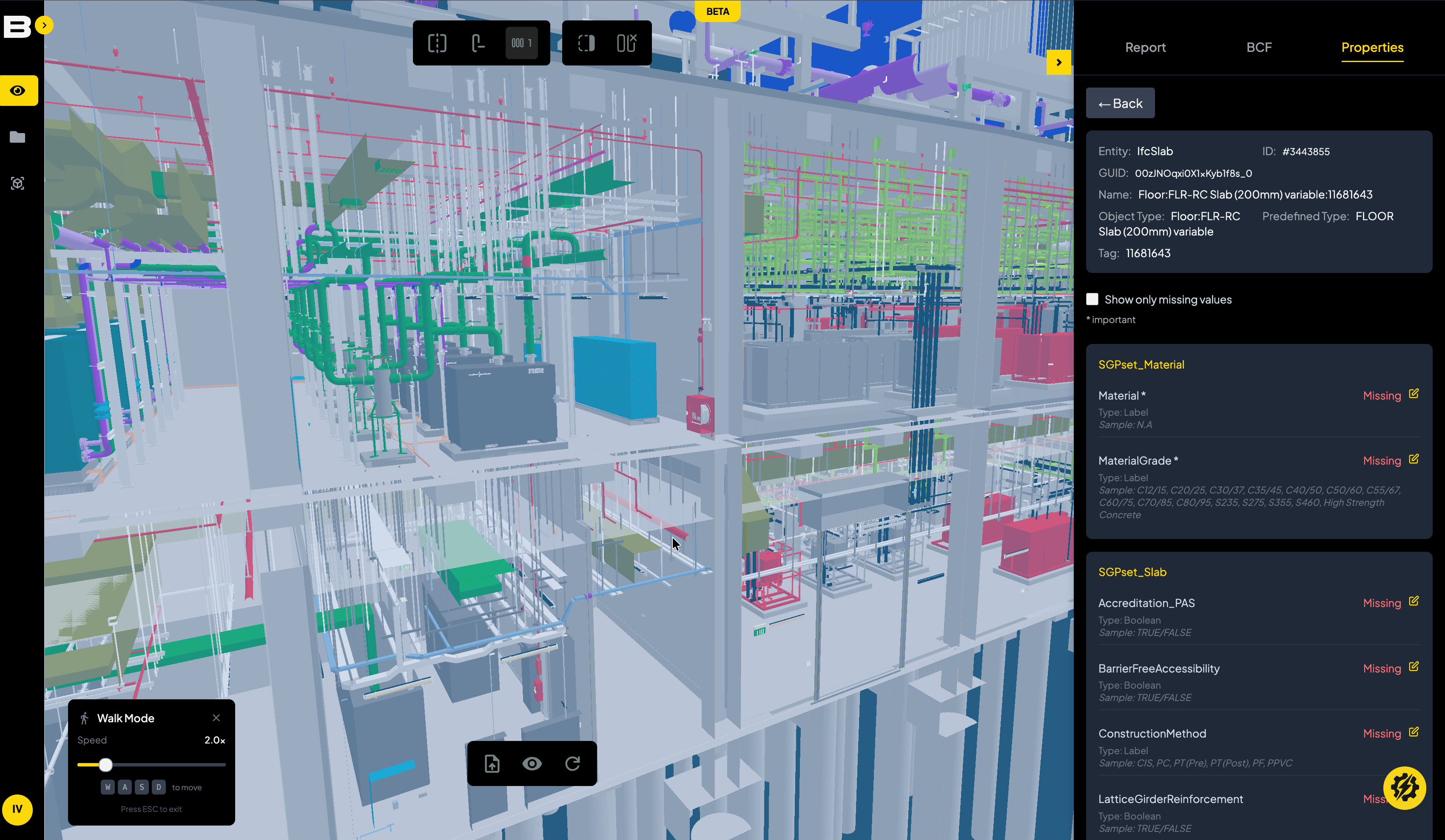
The Bimeco Validator supports models up to 5GB completely free. This accommodates most building projects, including large infrastructure developments and multi-discipline federated models.
For logged-in users, models are cached on Singapore-based data centers, enabling significantly faster loading times on subsequent sessions. This server-side caching also means you can view and edit complex models smoothly even on lower-spec devices—the heavy processing happens in the cloud, not on your local machine.
In our benchmark tests, a typical 1GB architectural model with 4,000 errors loads in under 15 seconds for returning users. No waiting, no frustration.
3D Viewer & Entity Inspection
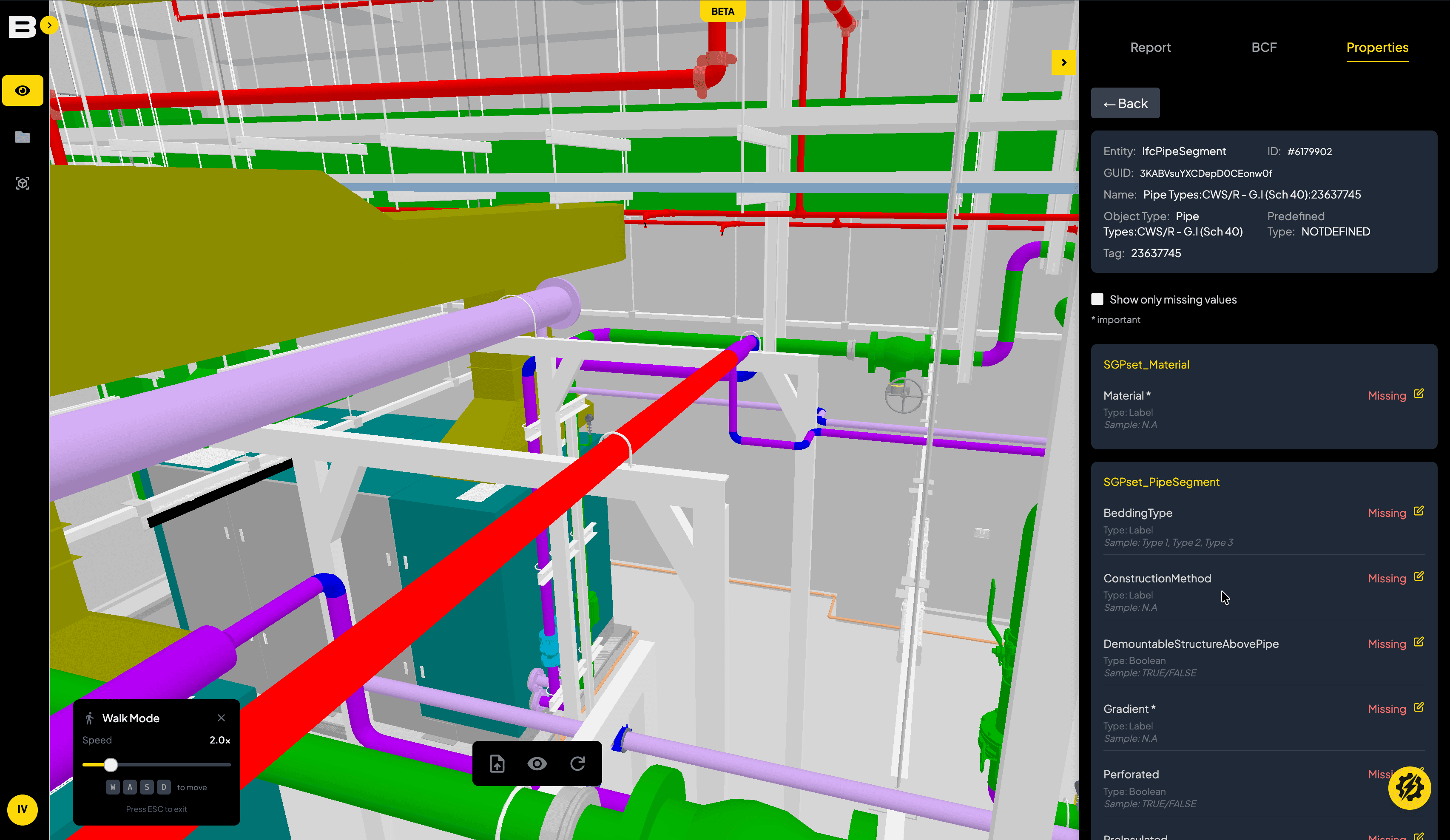
Once your model loads, the integrated 3D viewer lets you inspect detailed property values for every system entity. Click on any object's unique ID in the validation report to highlight it in the viewer—this makes it easy to locate specific elements in complex models.
The validator displays all IFC+SG parameters required by regulatory agencies, organized by entity type. For example, clicking on a slab element shows the complete list of BuildingElementProxy parameters expected by BCA, URA, and other authorities.
This detailed view ensures you understand exactly what data each agency needs and where it's missing in your model. The viewer follows the industry mapping table compliance requirements, so you can be confident you're checking the right parameters.
Search & Filter Queries
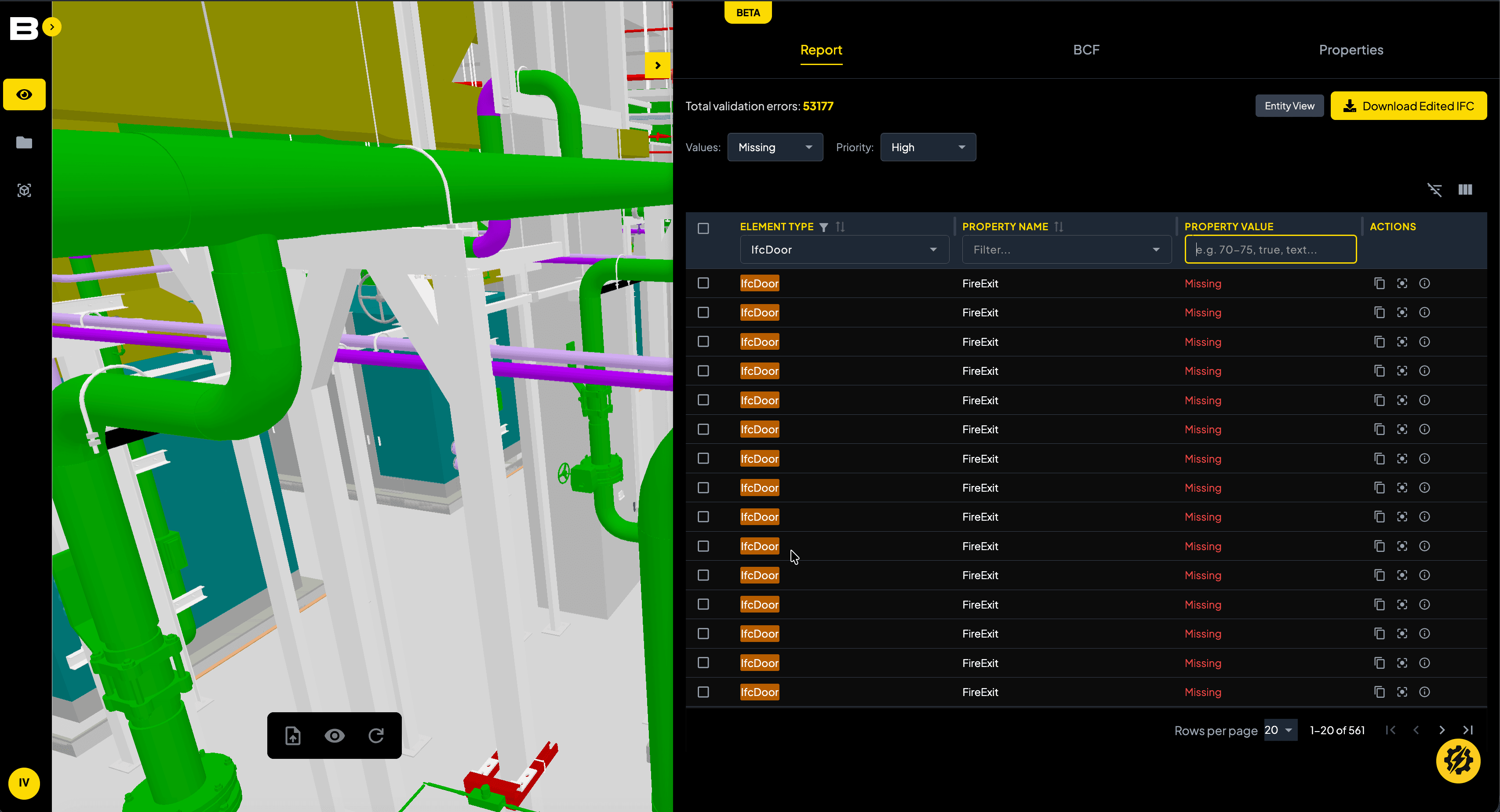
With thousands of errors in a typical BIM model, finding specific issues quickly is critical. The Bimeco Validator includes powerful search and filter capabilities to help you work efficiently.
Search by IFC entity type—for example, show all doors (IfcDoor), all windows (IfcWindow), or all structural columns (IfcColumn). Filter by error type to focus on specific parameter issues. Group results by floor level or discipline to tackle errors systematically.
In our experience, the average BIM model contains up to 5,000 errors that need to be corrected before CORENET X submission. These search and filter tools help you handle large error counts without getting overwhelmed—you can prioritize critical parameters first and work through the list methodically.
IFC Parameter Editing
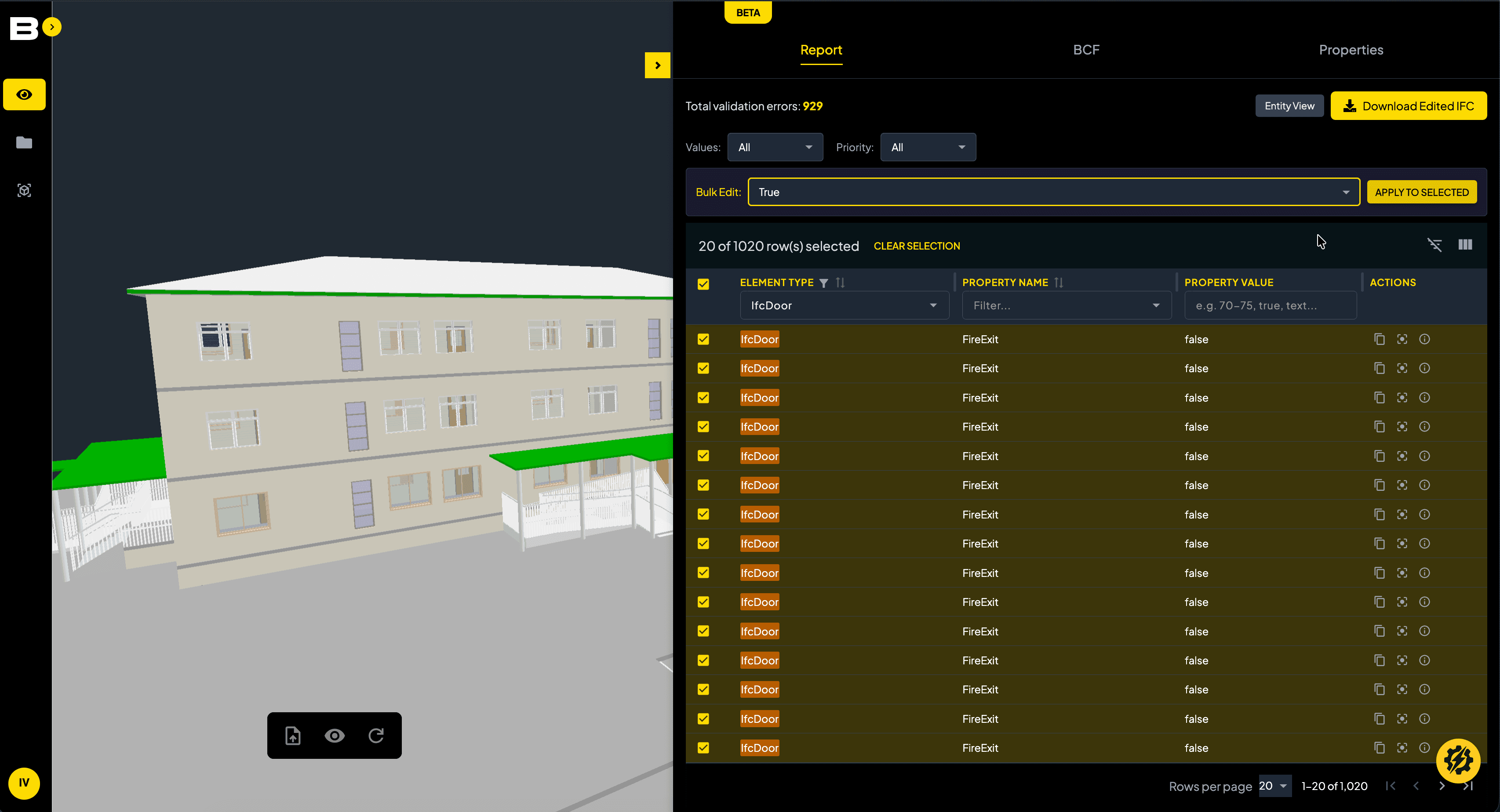
Perhaps the most powerful feature: you can edit IFC+SG parameters directly in your browser, without returning to Revit, ArchiCAD, or any other BIM software.
The validator provides controlled input interfaces that ensure full compliance with CORENET X submission guidelines. Dropdown menus, predefined value lists, and validation rules prevent invalid data entry. This means you can be confident that edited values comply with the latest model content standards mandated by regulatory agencies.
For example, when editing fire-rated elements, the validator presents only valid fire-rating codes recognized by SCDF. When entering accessibility parameters, it shows only BCA-approved values from the Code of Practice on Accessibility.
Save-in-Progress & Bulk Editing The validator includes save-in-progress features so you can resume model data updates across multiple sessions. In our benchmark tests, resolving 5,000 errors takes up to a week—the ability to save progress and return later is essential.
For repetitive corrections, bulk-editing capabilities let you apply the same parameter value to multiple elements simultaneously. If you have 200 doors missing the same fire-rating value, you can select all 200 and update them in one operation.
Collaborative Workflows For projects requiring multiple contributors, the validator caches large information models with a database service. This enables smooth viewing and editing over a web browser, even for complex federated models involving architectural, structural, and MEP disciplines.
Team members can work on different sections simultaneously, making the validator a true collaborative touchpoint before final CORENET X submission. No need to pass IFC files back and forth via email or file-sharing platforms.
Upcoming Features (Q2 2026 Release)
The validator roadmap includes several exciting features scheduled for Q2 2026 release:
🤖 AI-Assisted Search Converse with an AI interface to query BIM models and extract deeper insights. Ask natural language questions like "Show me all fire-rated doors on Level 3" or "Which walls are missing thermal properties?" The AI understands your intent and returns relevant results instantly, making model interrogation faster and more intuitive.
🔗 Model Federation Support for multi-discipline coordination through model federation. Load architectural, structural, and MEP models simultaneously, maintain proper access controls for each trade, and ensure consolidated submissions meet all CORENET X requirements.
🔍 Clash Detection Automated clash detection to identify conflicts across federated models before submission. Catch structural beams clashing with MEP ducts, architectural elements interfering with structural components, and other coordination issues that could delay approval.
🔄 Bi-Directional Revit Sync Seamless roundtripping between the Bimeco Validator and Revit. Make edits in the validator, sync back to your Revit model automatically. This eliminates the manual export-import cycle and ensures your native BIM model stays up-to-date with validator corrections.
All upcoming features will remain free for all consultants and contractors.
Getting Started with the Free Tool
Ready to validate your models? Here's how to get started:
Export IFC+SG from your BIM software Use the official export guides for Revit, ArchiCAD, OpenBuildings, or Tekla to ensure proper IFC+SG format.
Upload to the Bimeco Validator Visit viewer.bim.com.sg and upload your model. No login required for basic validation—though logged-in users get faster loading through server caching.
Review, edit, and validate Use the integrated viewer and editing tools to correct parameter errors. Save your progress and resume work across multiple sessions. Export the corrected IFC+SG file when ready for CORENET X submission.
For a hands-on experience, try our demo model to see how the validator works in practice.
Conclusion: Free Tools for CORENET X Success
CORENET X compliance doesn't require expensive software subscriptions. The Bimeco Validator provides all the tools consultants and contractors need to validate and edit IFC+SG models—completely free.
Whether you're preparing for the 1 October 2026 mandatory submission deadline or already working on CORENET X projects, the validator helps you meet regulatory requirements efficiently. Handle large models, validate thousands of parameters, make direct edits in your browser, and collaborate with your team—all without spending a dollar on software licenses.
As Singapore's built-environment industry transitions to digital submissions, accessible tools like the Bimeco Validator ensure firms of all sizes can participate in the CORENET X platform successfully.
Ready to validate your first model? Try the Bimeco Validator now, or contact our BIM team for dedicated support with your CORENET X submissions.
Frequently Asked Questions

Related Articles
BIM Implementation in Singapore: A Practical Guide for Subcontractors
A practical guide for MEP subcontractors adopting BIM in Singapore. Learn workflows, costs, and CORENET X requirements for 2026 compliance.
CORENET X BIM Submission Tool: The Bimeco Validator
Need to validate and update your BIM models for CORENETX submission? The Bimeco Validator helps users validate and update their model files for CORENET X compliance.
CORENET X BIM Requirements & Timeline [2026 Guide]
CORENET guide for Singapore building approvals. Learn CORENET X, IFC+SG requirements, and mandatory BIM submission preparation.