
- Published on
Beyond 3D Models: Why Strategic BIM Services Are the Key to Construction ROI
The Evolution of Project Delivery: Is BIM Replacing CAD?
Modern construction projects have become staggeringly complex. A single hospital build can involve thousands of interdependent systems, hundreds of stakeholders, and millions of data points, none of which a flat 2D drawing can adequately manage. That gap between what traditional drafting tools deliver and what today's projects demand is exactly where Building Information Modeling (BIM) enters the picture.
For decades, Computer-Aided Design (CAD) was the industry standard. It digitized the drafting table, but it didn't fundamentally change how project data was organized, shared, or updated. Drawings existed in silos. Conflicts between structural, mechanical, and architectural files were only discovered on-site, after the concrete was already poured.
BIM changes the entire equation.
| Feature | Traditional CAD | BIM |
|---|---|---|
| Output | 2D/3D geometry | Intelligent, data-rich models |
| Collaboration | File-based, siloed | Cloud-connected, real-time |
| Error detection | On-site, reactive | Pre-construction, proactive |
| Project lifecycle | Design phase only | Design through facility management |
| Data management | Limited metadata | Structured, queryable information |
BIM doesn't replace CAD. Instead, the coordinated, clash-free BIM model becomes the foundation, and detailed shop drawings are generated from it. What was once the final deliverable is now just one layer of a single source of truth that guides every decision from groundbreaking through decades of building operations.
The numbers reflect this momentum: the BIM market is projected to grow from $9.93 billion in 2025 to $19.04 billion by 2030, fueled by government mandates and escalating project complexity.
But to understand why that value is real, you first need to understand what BIM actually is and what it's capable of beyond the 3D model on your screen.
Defining BIM: More Than Just Geometry
The phrase building information modeling (sometimes spelled building information modelling in international standards) gets thrown around constantly in the construction industry, but it's worth slowing down to unpack what it actually means. Because once you understand each word, the strategic value becomes undeniable.
Start with "Building." This isn't limited to the physical structure. It encompasses every system inside it: electrical, mechanical, plumbing, structural, and beyond. Then comes "Information", arguably the most powerful word in the acronym. A BIM model isn't just geometry; it's a living database attached to that geometry. Every wall, beam, and duct carries embedded data: material specs, manufacturer details, cost codes, and maintenance schedules. Finally, "Modeling" (or Management) signals that BIM is an active process, not a static deliverable.
BIM is fundamentally a data model, not a drawing tool. In Singapore, CORENET X demonstrates this: regulatory agencies extract information directly from the BIM model for automated code compliance review, because the data is structured and queryable by design.
The Dimensions That Add Real Value
BIM scales in sophistication through a series of "dimensions," each layering new intelligence onto the model:
- 3D — Spatial coordination and design visualization
- 4D — Time and scheduling integrated directly into the model
- 5D — Cost estimation linked to model elements in real time
Each dimension transforms how project teams make decisions, shifting conversations from reactive to proactive.
BIM Uses Across the Project Lifecycle
BIM Uses refer to specific applications of the model at different project stages, from early design visualization and code compliance analysis to prefabrication planning and long-term facility management.
In the pre-construction phase, BIM's impact is most financially significant. Teams can identify coordination conflicts, validate constructability, and pressure-test schedules before a single shovel breaks ground. Without this digital rehearsal, projects without BIM see failure costs (rework, wasted materials, lost labor) averaging over 11% of the total budget, according to USP Research.
That number hints at something bigger: the financial case for BIM isn't just about better models. It's about preventing expensive mistakes, a story the next section will quantify in full detail.
The Financial Imperative: ROI of BIM Clash Detection and Coordination
Understanding what BIM actually costs versus what it returns is where the conversation gets compelling. The technology is impressive, sure, but the numbers are what drive boardroom decisions.
How Clash Detection Stops Expensive Surprises
Clash detection works by running automated checks across federated models, covering structural, architectural, and MEP (Mechanical, Electrical, and Plumbing) systems, to flag conflicts before a single worker sets foot on site. Think of it as a stress test for your building, conducted entirely in software. A duct running through a structural beam. A sprinkler line colliding with a conduit run. These conflicts cost almost nothing to fix at the coordination stage and tens of thousands of dollars to rework mid-construction.
The math is stark: according to Arkance World, every $1 invested in BIM clash detection returns an estimated $8 to $10 saved during the construction phase. On a $10 million project, a $50,000 BIM coordination effort could realistically prevent $400,000 to $500,000 in field rework costs.
Disciplined digital coordination isn't overhead. It's the single highest-return investment most construction budgets will ever make.
Reducing Failure Costs With 4D and 5D Modeling
Rework isn't the only budget killer. Schedule overruns and cost estimate drift are equally damaging. This is where 4D (time-sequencing) and 5D (cost integration) modeling deepen the ROI story further. Research from USP's Digitalisation and BIM H2 2024 Report shows BIM implementation reduces project failure costs from roughly 11% to approximately 7%, with 4D and 5D modeling pushing those numbers even lower.
ROI Breakdown: BIM Coordination Value
- Clash detection ROI: $8 to $10 saved per $1 spent
- Failure cost reduction: From ~11% to ~7% of project value
- Combined 4D/5D impact: Further reduces budget exposure below 7%
Those aren't marginal improvements. On large-scale projects, trimming failure costs by even 4 percentage points translates directly to profit margin recovery.
Understanding where these savings come from, however, requires a closer look at the specific services that generate them, from scan-to-BIM workflows to full digital twin delivery.
Core BIM Services: From Scan-to-BIM to Digital Twins
The ROI figures explored earlier don't materialize from a single tool. They're the cumulative result of deploying the right BIM services at the right project phase. Think of the BIM ecosystem as a layered stack, where each service adds a distinct dimension of intelligence to your project data.
3D Modeling and Coordination
Best for: Any new construction project requiring multi-discipline clash detection.
3D modeling is the foundation. Structural, mechanical, electrical, and plumbing systems are modeled in a shared environment, enabling real-time clash detection before a single crew member breaks ground. In practice, early engineering coordination eliminates the risk of expensive on-site rework, resolving conflicts digitally before they become costly RFIs (Requests for Information) in the field.
Scan-to-BIM
Best for: Renovation, retrofit, and adaptive reuse projects where original drawings are unreliable.
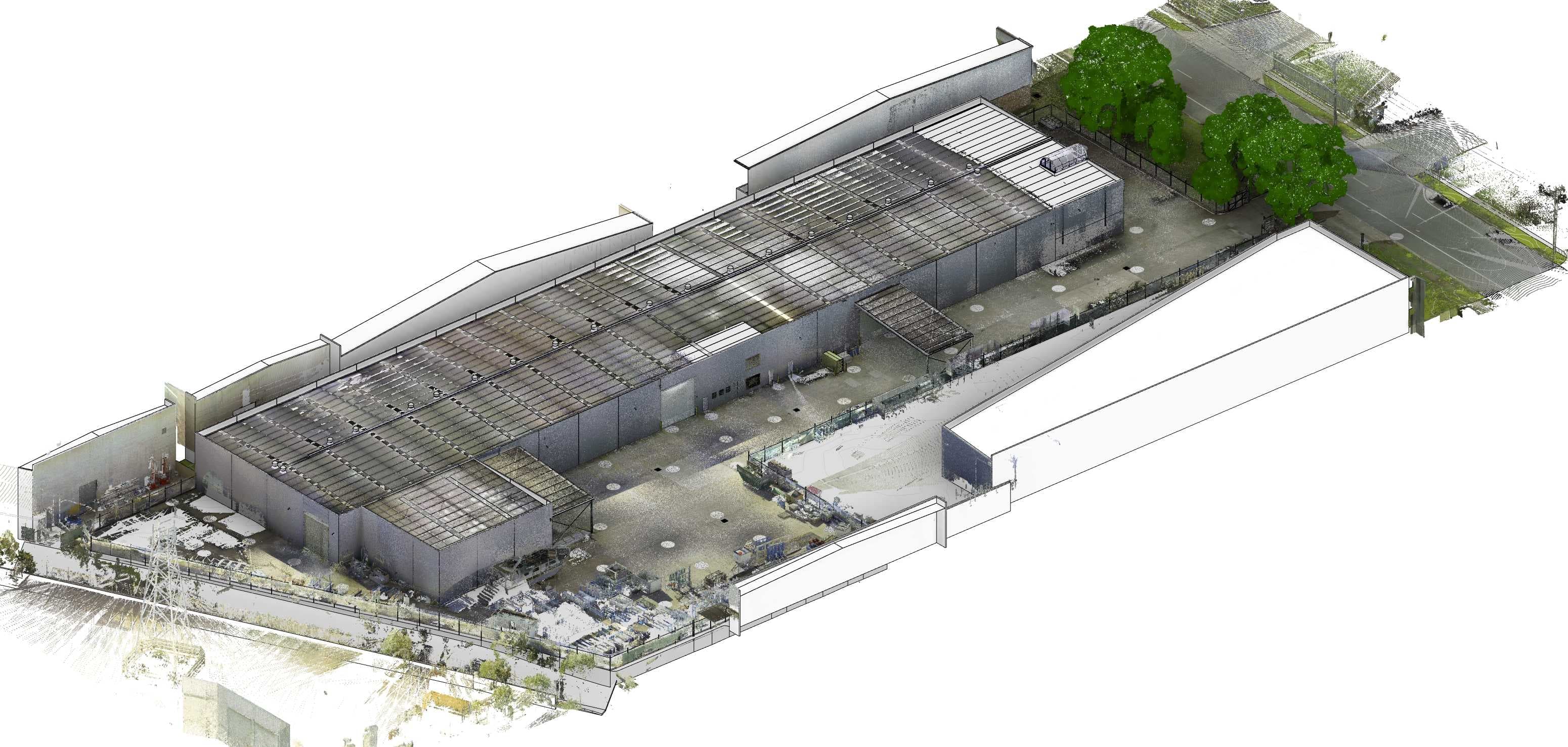
LiDAR (Light Detection and Ranging) scanners capture millions of data points per second, generating a point cloud that becomes the basis for a precise as-built model. This process is essential for brownfield projects where original paper drawings are inaccurate or missing entirely, a reality that's far more common than owners expect. The scan acts as a foundation model for engineers to lay on Addition and Alteration (A&A) works, ensuring new designs are coordinated with the actual site context. Accurate as-built data isn't a luxury on renovation projects; it's the difference between a budget and a disaster. Learn more about scan-to-BIM workflows and point cloud processing.
4D Scheduling
Best for: Complex projects with phased occupancy or tight site logistics.
Linking the 3D model to a construction schedule creates a 4D simulation, a visual playbook that reveals sequencing conflicts weeks in advance. Site managers can optimize crane placement, material deliveries, and crew scheduling before mobilization begins.
5D Cost Estimation
Best for: Owners and general contractors who need live budget visibility throughout design development.
Embedding cost data into model elements enables real-time quantity take-offs. Design changes automatically recalculate budget impact, replacing the traditional end-of-phase estimate scramble with continuous financial clarity. Explore 5D BIM cost estimation services.
BIM for Facility Management (6D/7D)
Best for: Asset-intensive owners managing long operational lifecycles.
At project handover, the BIM model forms the basis of a visual digital twin, populated with equipment specs, maintenance schedules, and warranty data. It can then be connected to digital twin platforms like Autodesk Tandem and iTwin Experience to create a connected digital twin, where live sensor data, IoT feeds, and operational systems are layered onto the model.
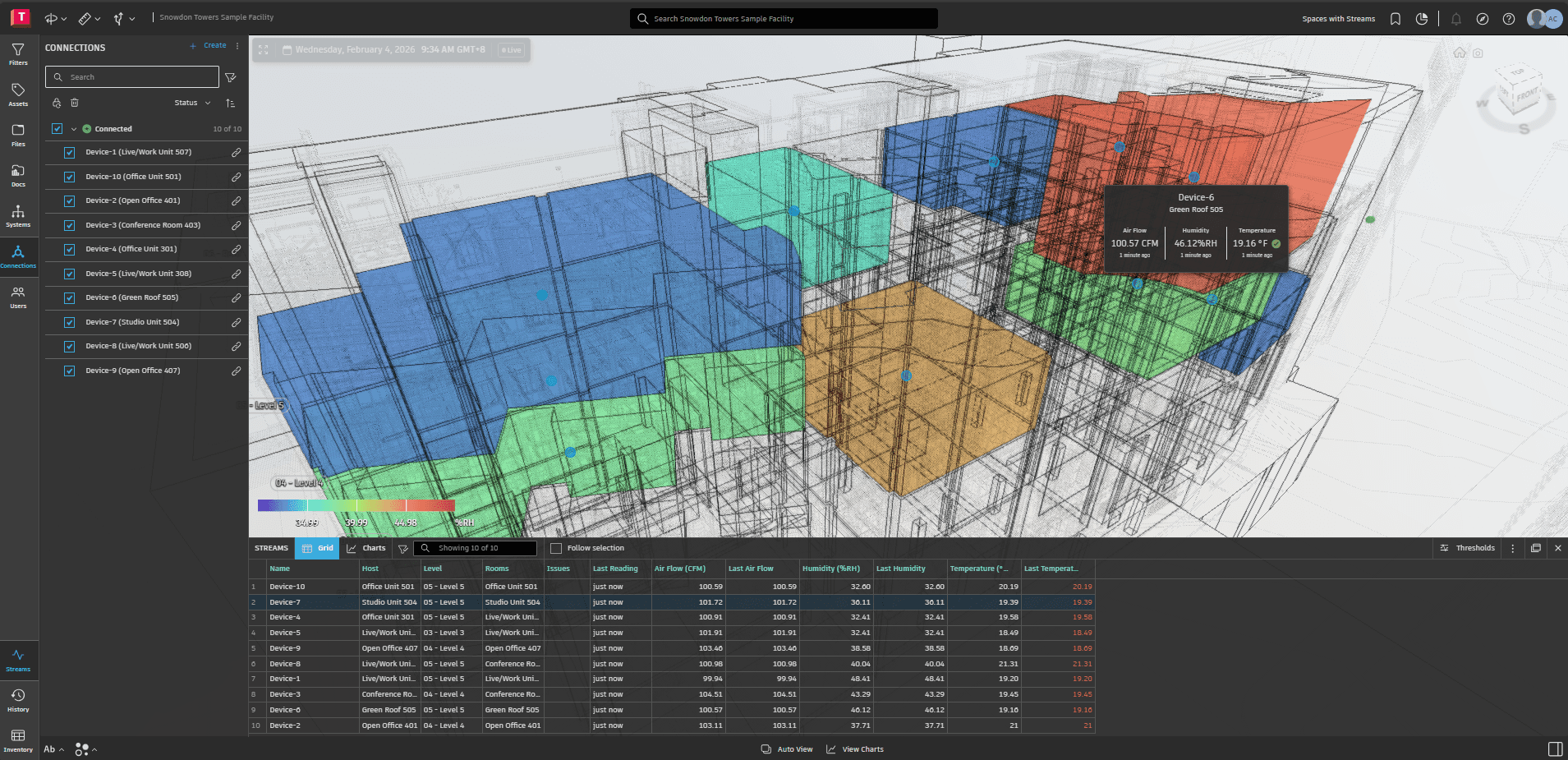
Owners inherit an operational intelligence platform, not just a building. See our guide on 6D BIM for facility management.
Each of these services requires specialized expertise, which naturally raises a critical strategic question: should that expertise live in-house, or is there a smarter way to access it?
The Strategic Choice: In-House vs. Outsourced BIM Services
Once the right BIM services are identified, the next decision is equally consequential: build internal capacity or partner with a specialized firm? Both paths deliver results, but the cost and flexibility profiles are strikingly different.
Maintaining an in-house BIM modeling team carries significant overhead. Software licenses for industry-standard platforms routinely run thousands of dollars per seat annually. Add high-end workstations capable of processing complex models, competitive salaries for experienced BIM coordinators, and ongoing training costs, and the investment compounds quickly before a single model is delivered.
Outsourcing BIM services to specialized firms can save organizations over 25% in costs compared to recruiting, equipping, and maintaining an internal department, according to VMTS research, a margin that directly strengthens project budgets.
| Factor | In-House Team | Outsourced Partner |
|---|---|---|
| Upfront cost | High (hardware, licenses) | Low (subscription/project-based) |
| Scalability | Slow, tied to hiring cycles | Immediate, project-aligned |
| Talent access | Limited to local market | Global specialist pool |
| Ongoing overhead | Fixed, regardless of workload | Variable, scales with demand |
| Technology updates | Firm's responsibility | Partner's responsibility |
Beyond cost, immediate scalability is arguably the stronger argument for outsourcing. A surge in project scope doesn't require emergency hiring; an external partner simply deploys additional resources. This flexibility is particularly valuable on large EPC (Engineering, Procurement, and Construction) contracts where modeling demands shift dramatically between design, coordination, and construction phases.
Outsourcing also unlocks global expertise that local hiring simply can't match, with specialized knowledge in infrastructure, healthcare, or industrial facilities becoming accessible on demand. For a deeper look at how to outsource BIM effectively, see our dedicated guide. You can also explore top BIM outsourcing companies for partner comparisons.
Selecting a BIM Partner: A Framework for EPC Leads
The difference between a BIM investment that delivers ROI (Return on Investment) and one that stalls often comes down to partner selection. Not every provider offering BIM services has the depth your project demands. Use this checklist before signing any engagement:
Sector-specific track record: Verify demonstrated experience in your project type. Infrastructure, healthcare, and residential workflows each carry distinct modeling requirements and clash-detection priorities.
Regulatory compliance knowledge: Confirm the provider understands local mandates. In Singapore, for instance, the Building and Construction Authority requires BIM e-submissions for qualifying projects, a non-negotiable capability.
Industry-standard technology stack: Expect proficiency in Revit, Navisworks, and Tekla at minimum. Proprietary-only workflows create handoff risk.
Remote collaboration protocols: Distributed teams need structured coordination cadences, clear file-naming conventions, and reliable Common Data Environment (CDE) access.
Scalability and post-delivery support: A strong partner grows with your project pipeline, not just through contract completion.
The right BIM partner isn't a vendor; they're a strategic extension of your project leadership. Ready to evaluate your options? Get in touch to start with a structured capability assessment before your next bid cycle.
Key Takeaways
- BIM doesn't replace CAD. The coordinated, clash-free BIM model becomes the foundation, and detailed shop drawings are generated from it.
- Every $1 invested in clash detection returns an estimated $8 to $10 saved during construction, making digital coordination one of the highest-return investments in any project budget.
- 4D scheduling and 5D cost estimation reduce project failure costs from roughly 11% to below 7%, directly recovering profit margin.
- Outsourcing BIM services can save over 25% compared to maintaining an in-house team, with the added benefit of immediate scalability and global specialist access.
- When selecting a BIM partner, prioritize sector experience, regulatory knowledge, and a proven technology stack over price alone.
Frequently Asked Questions

Related Articles
BIM Level of Development (LOD): LOD 100 to 500 Explained
A practical breakdown of BIM LOD stages from 100, 200, 300, 350, 400, and 500, explaining how each level of development evolves from design to construction and project handover.
Faster Permits, Fewer Reviewers: The Case for Model-Based Permitting
U.S. building departments face staffing shortfalls, retirements, and rising demand. Model-based permitting using BIM and IFC can cut review cycles and scale with fewer reviewers.
From IFC to Handover: What a GC Actually Needs from a BIM Partner
What general contractors actually need from a BIM partner, from IFC handoff and RFI turnaround to trade coordination, field adoption, and retention release.